
Construction & Rehab

Draw Management for Construction & Rehab Loans

Turn a construction or rehab loan’s holdback into a structured, line-item budget your borrower draws against as work gets done, with evidence, inspections and line-by-line approvals that flow straight into servicing.
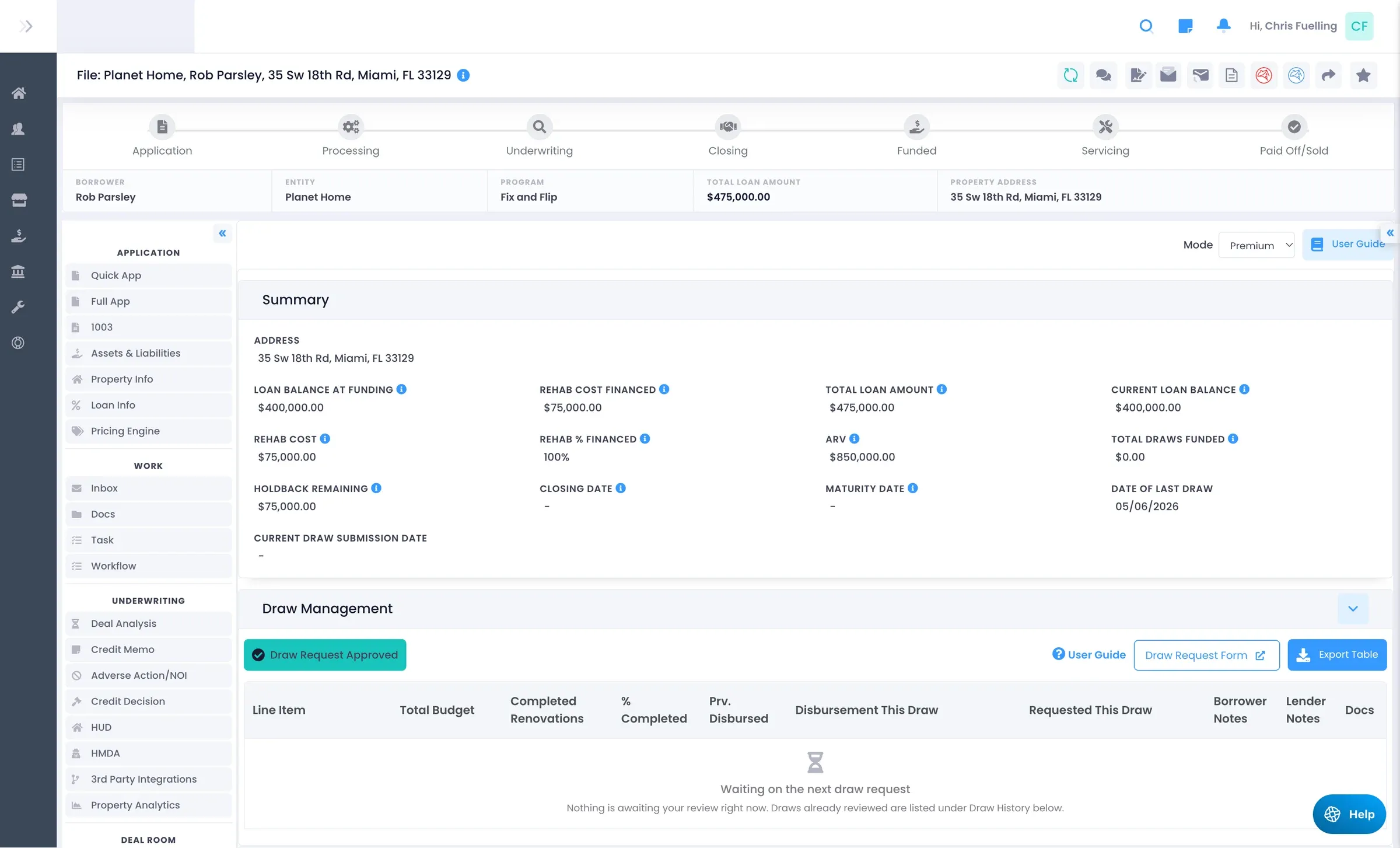
LendingWise draw management summary with rehab cost financed, holdback remaining, ARV and draw request history
The Draw Lifecycle

No More Hand-Keyed Draws

Publish a Scope of Work once, and every request, inspection and approval happens against the same line items.

  1. Publish a budget template
  2. Borrower builds or confirms the Scope of Work
  3. Borrower requests draws with evidence
  4. Optional third-party inspection
  5. You review & approve line by line
  6. Funds wired & disbursed in servicing
Two Modes

Match the Draw Process to the Deal

Each rehab loan runs in Standard or Premium mode, switched from the Mode dropdown on the loan’s Draw Management tab.

Standard

A Simple Draw Log

You hand-enter each draw as a row: submission date, amount requested, amount approved, rehab % financed, draw fee, wire amount, wire-sent date and notes, with a document upload per draw.

Premium

The Full Construction-Finance Workflow

  • A line-item Scope of Work built from reusable templates
  • A branded borrower / contractor web form
  • Draw requests against specific line items, with evidence
  • Line-by-line lender review, plus revisions
  • Third-party inspections, holdback tracking & PDF draw statements

Two Phases, One Place

Before closing, the borrower submits a budget and you collaborate on the line items until you approve the Scope of Work. After closing, the same screen becomes the draw phase, and the borrower requests draws against those line items as work gets done.

The Scope of Work is a two-level budget of categories and line items, up to 20 categories per loan, copied from a template you can map to each loan program.

  • Soft Costs
  • Site Work
  • Foundation
  • Exterior
  • Interior
  • MEP
  • Appliances
  • Kitchen
  • Bathrooms
  • Final Clean

Borrowers and contractors work in a branded web form with no back-office login, with a live budget meter, per-line-item uploads and requests by percentage or dollar amount.
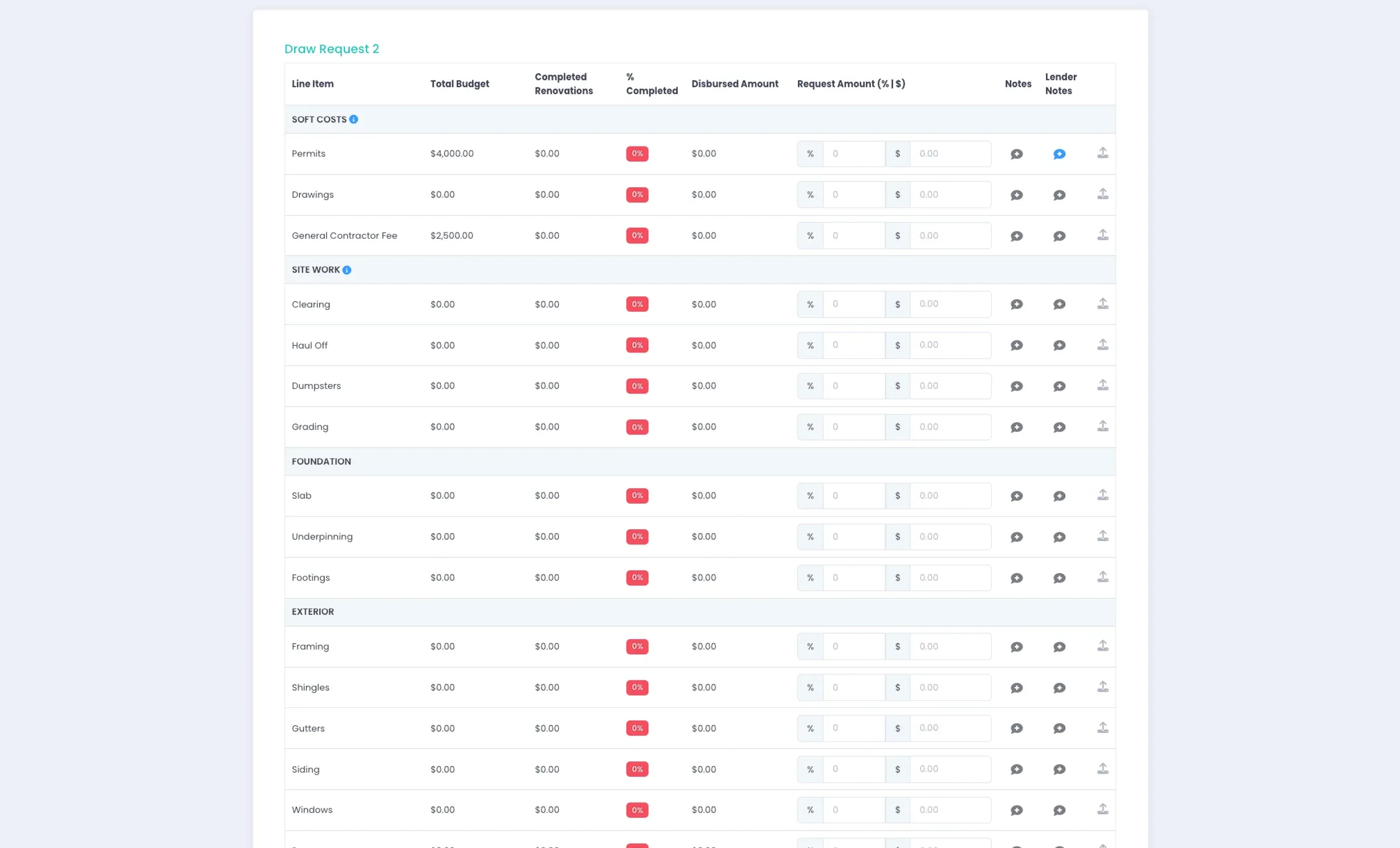
LendingWise draw request form with Scope of Work line items grouped by category and request amount by percent or dollars

Approve, Adjust or Send Back. Never All-or-Nothing.

  • Per line item, adjust the amount, add lender notes, set a rejection reason and open the evidence attached to that line.
  • Accept or reject the draw. Accepting moves the amounts into disbursed/completed; rejecting sends it back to the borrower with your notes.
  • On pending rows, inline-edit the rehab % financed, draw fee and wire-sent date (auto-saved).
  • When nothing is waiting on you, the table tells you which state you’re in: waiting on the first draw, the next draw or a revised request.

Because review is per line item, you release exactly what’s warranted and keep a full record of the back-and-forth with the borrower.

LendingWise draw management tab with loan summary, line-item draw table and draw request history
Built In

Everything Around the Draw

  • Inspections Through Trinity

    Order budget/feasibility reviews and draw inspections that verify percent-complete from the loan file. Push budget docs to the inspector, pull reports back and keep status in sync automatically.
  • Evidence Where It Belongs

    Photos, invoices and permits attach to individual line items, stamped with who uploaded them, when and at which draw stage. Every upload emails the assigned team and is recorded in Note History and the Change Log.
  • Budget & Holdback Tracking

    A live summary of rehab cost financed, total draws funded, holdback remaining, current loan balance, completion % and the date of the last draw, recalculated as you approve.
  • Revisions & Cancellations

    Borrowers can request Scope of Work revisions (if you allow it). Cancelling a pending draw or revision restores the last approved state, so the budget never gets corrupted.
  • PDF Draw Statements

    The draw history lists every Scope of Work, revision and draw with amounts, fees and wire dates, and exports to a branded PDF draw statement.
  • Hand-Off to Servicing

    An approved draw carries into loan servicing with its amount, rehab % financed, draw fee and wire amount. Marking it Wire Sent disburses against the holdback, with full reversal support.

Company Settings

Standardize Your Whole Book

Publish one template, map it to a loan program and lock down what borrowers can change, so every deal starts from the same, consistent budget.

  • Draw fee deducted from each approved draw
  • Whether borrowers can add, edit or remove categories
  • Whether borrowers can add, edit or remove line items
  • Whether borrowers can submit Scope of Work revisions
  • Whether a revision can exceed the financed rehab cost
  • Whether uploaded documents can be deleted

Sign up now & get started in minutes!

Let us show you how our end-to-end system can transform your lending operations:

Book Demo