
Loan Pricing Engine With Live Borrower Quotes
A native pricing engine for private lenders: turn your rate sheet into programs with base rates and points, adjusters, leverage caps and eligibility rules. Publish once, and every borrower, broker and loan officer quoting from your website prices from the same version, with each request landing as a loan file.
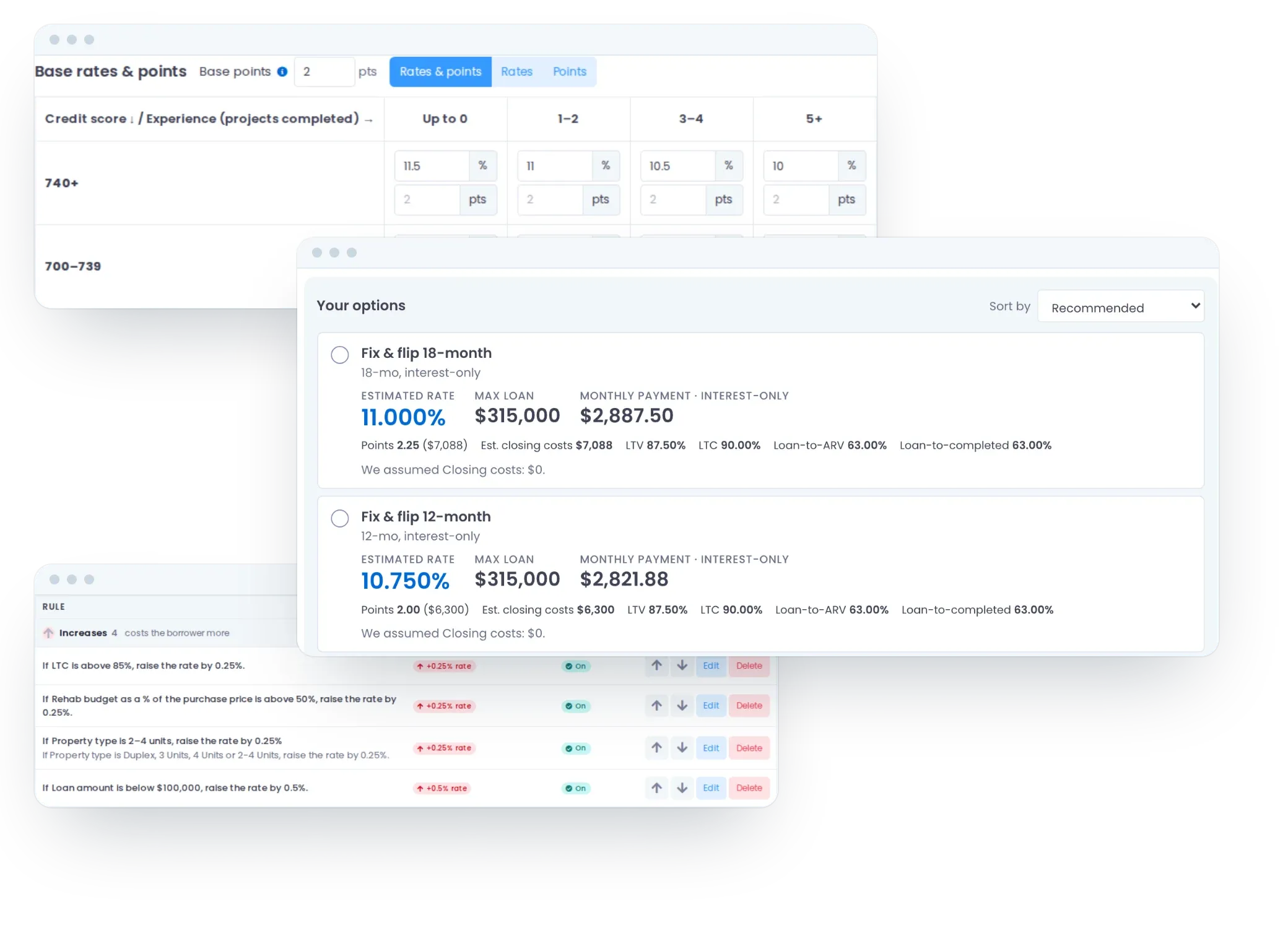
From Rate Sheet to Your Website
Six steps from an empty Pricing Engine to a live price on your site.
- 1
Set Up
One click adds starter loan types, the standard borrower questions and starter programs to build from. Nothing shows to borrowers yet. - 2
Add Your Programs
Name each program, map it to one of your loan programs, then set its terms, base rates and points, and leverage caps. - 3
Price for Risk
Add adjusters that move the rate, points or a cap, and eligibility rules that say who the program isn’t for. - 4
Test the Draft
Price a deal as a borrower would and read exactly why it priced that way, before anyone else sees it. - 5
Publish
Switch the program on and publish. A check runs first, and every version is kept. - 6
Put It on Your Website
Copy the link or the embed code from any branch, broker or loan officer’s Web Form Integration tab.
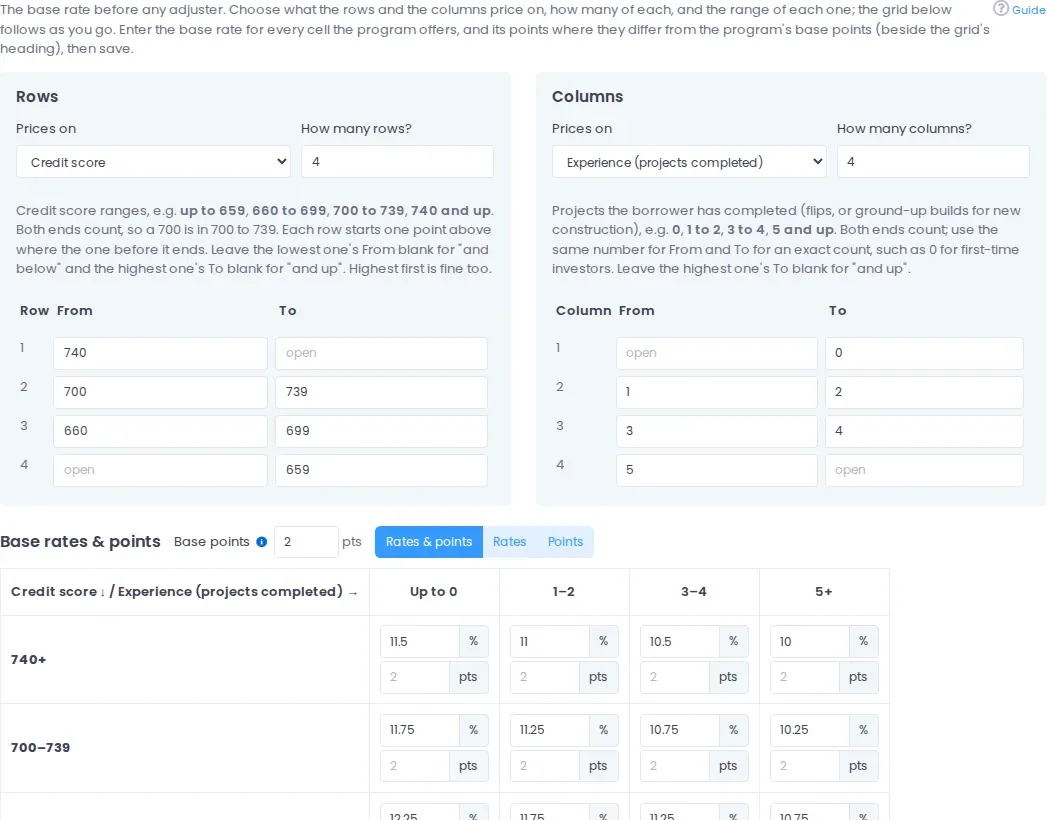
Your Rate Sheet, Rebuilt as Programs
Choose what the rows and columns price on: credit score, LTV, LTC, loan-to-ARV, DSCR or experience. Set the bands, type a rate and points in each cell, and leave a cell blank where the program isn’t offered.
Each program carries its own terms: term, interest-only or amortizing, base points, rate and loan rounding, a rate floor and ceiling, minimum points, and minimum and maximum loan.
On rehab and construction programs, choose Dutch or non-Dutch interest, whether the loan funds the purchase or the rehab first, and whether an interest reserve is financed into the loan.
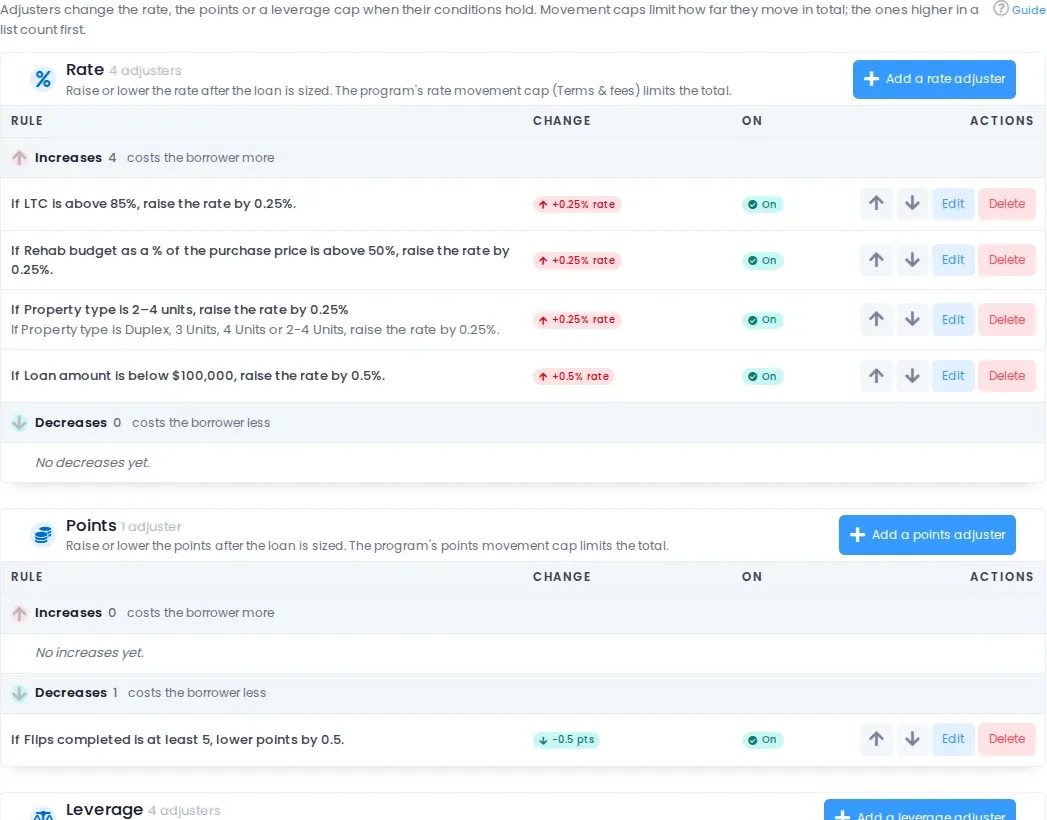
Adjusters & Eligibility That Read Like Sentences
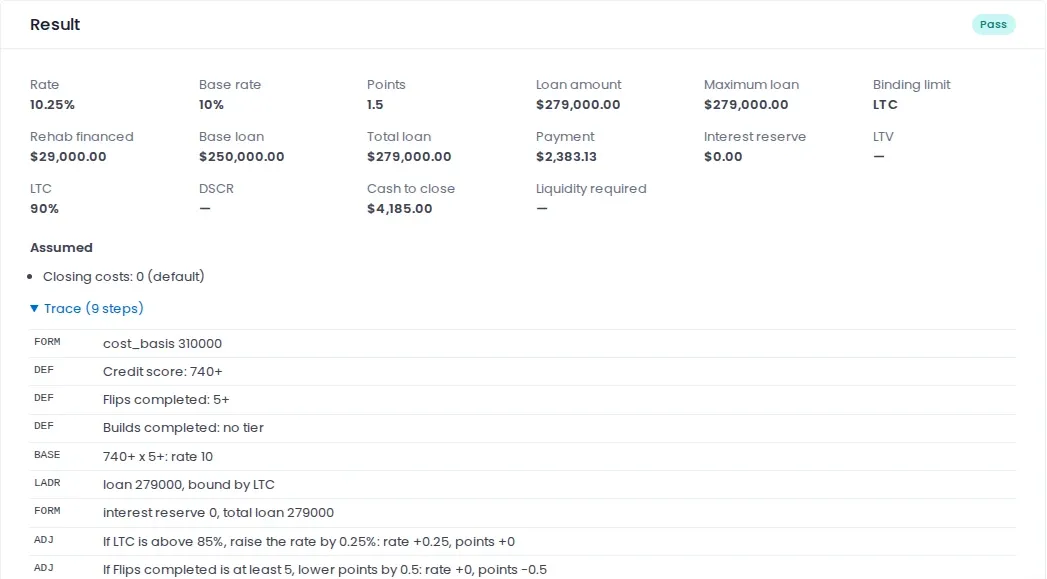
Build every rule as a sentence: if LTC is above 85%, raise the rate by 0.25%. Conditions use the borrower’s answers or the loan’s own numbers, such as LTV, DSCR and loan amount, with lists, ranges and zip codes that start with given digits.
- Rate, points and leverage adjusters run in the order you set, inside the movement caps you set.
- Eligibility rules sort a program into a hard fail (off the table), a blocker (shown without a price, still requestable) or a review flag (priced, with your note).
- You write what the borrower reads, and choose whether a failed program shows greyed out or stays hidden.
- Lend only where you lend: a rule on state or zip code, or the states and property types in each program’s custom loan guideline.
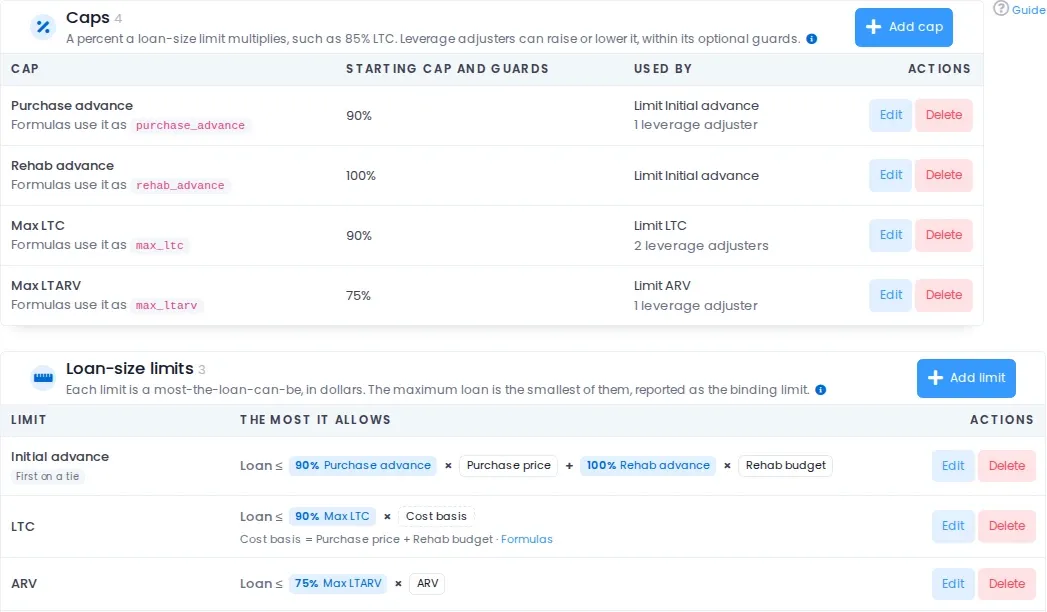
Leverage Caps & Loan-Size Limits
Add a standard cap (Max LTV, Max LTC, Max LTARV, Max LTCV, purchase and rehab advance, land and build advance) or a custom one. Each cap feeds a limit, and the smallest limit is the maximum loan, reported as the binding limit.
Every formula a program uses sits on one tab, edited without typing: cost basis, value basis, interest reserve, liquidity required and DSCR. Use the default, your company’s, or one just for that program.
Change Pricing Without Mispricing a Quote
Only a manager can change your Pricing Engine, and every change is recorded in the change log. Price any deal on the draft and read exactly how it priced: the grid cell, each adjuster and cap that applied, and the limit that set the loan.
- Save the deals you care about as scenarios. Before every publish, the header tells you which still price the same and what moved.
- The publish check stops anything that would misprice a quote, such as a missing rate grid or a formula that doesn’t work.
- Every published version keeps who published it, when, and its note. A quote keeps the version it was priced with.
Borrowers Price Their Own Deal
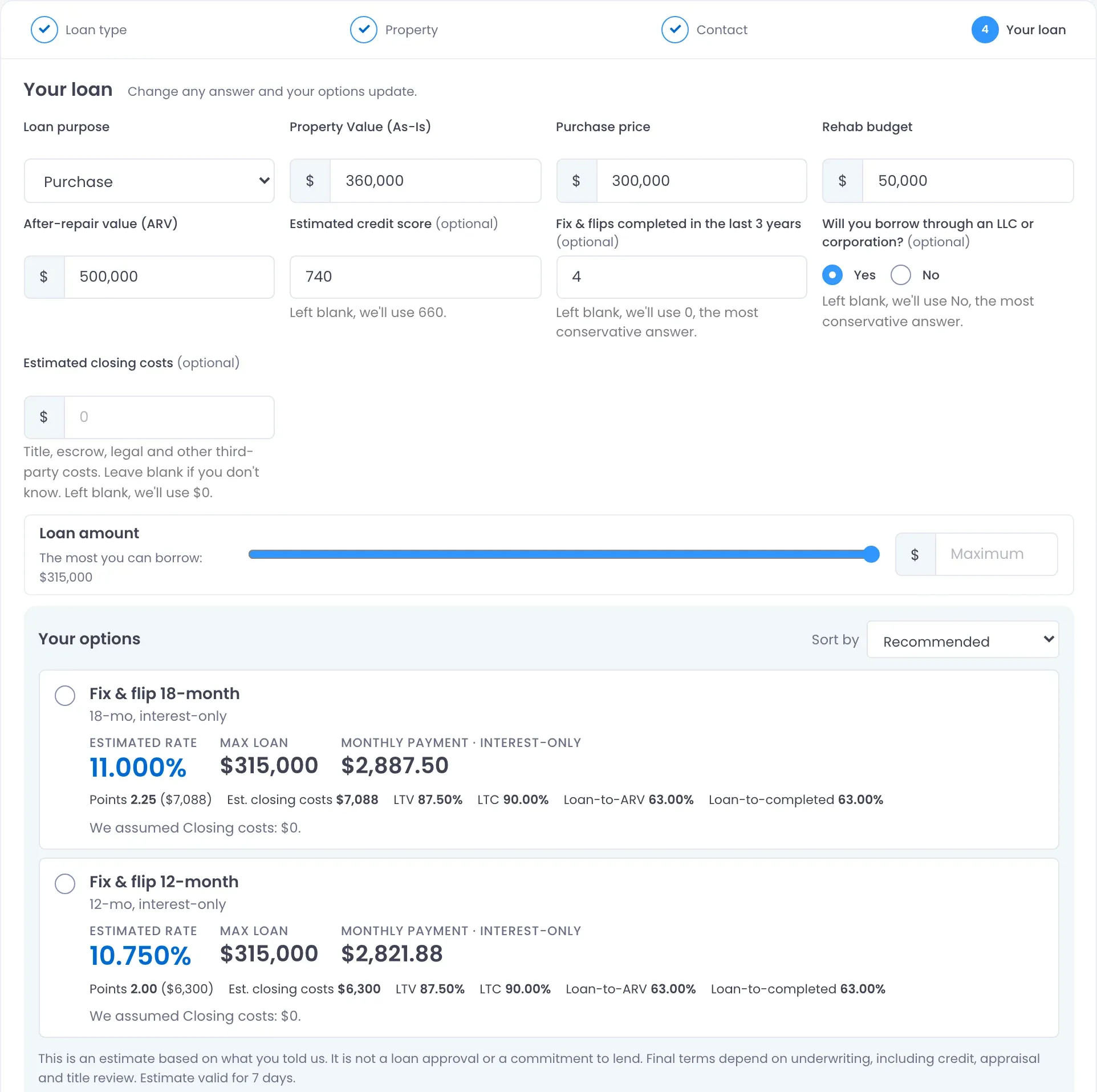
The Quote App takes a borrower through four steps: loan type, property, contact details and their loan. The last step is a single page: the deal questions on top, a loan amount slider, and their options below, which update as they answer.
- Each option shows the estimated rate, max loan and monthly payment, plus points, closing costs and LTV, LTC or loan-to-ARV where you choose to show them.
- Borrowers sort their options by lowest rate, lowest payment, highest loan amount or lowest closing costs.
- Left a question blank? The quote says what it assumed: a default you set, or the most conservative answer.
- Promotional programs carry a “Promotional” label and their end date, and come off the page on their own after the last day.
- No SSN or credit pull. The borrower confirms the loan’s business purpose before sending it.
One Rate Sheet for Your Whole Broker Channel
Give every broker in your network a Quote App link that credits them, and their loan officer when they have exactly one. Their borrowers get your pricing; nobody gets your rate sheet.
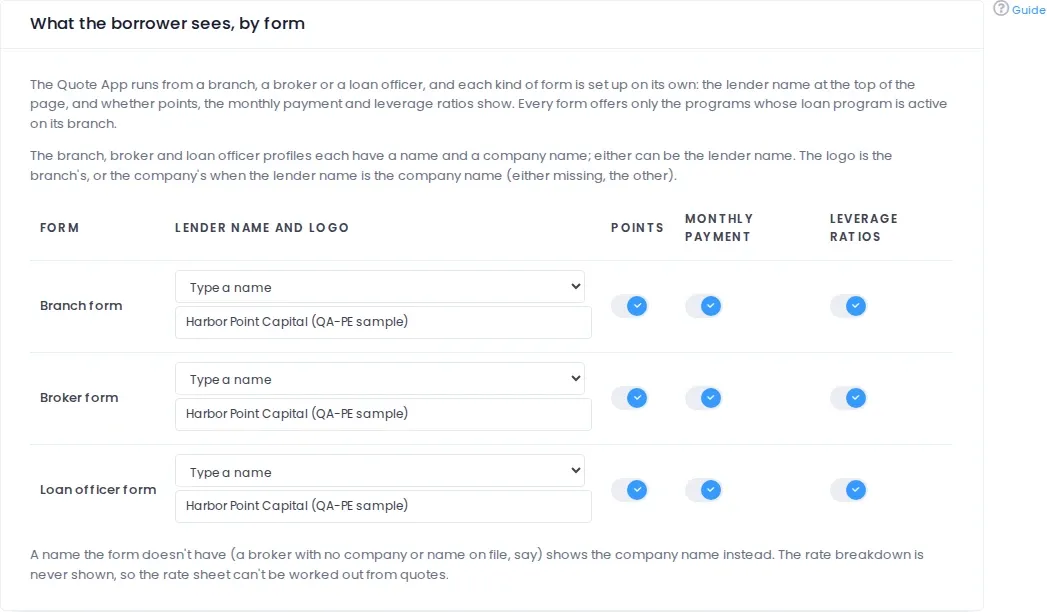
- Branch, broker and loan officer forms are set up separately: the lender name at the top, and whether points, the monthly payment and leverage ratios show.
- A form only offers the programs its branch offers, so each branch quotes its own programs and no one else’s.
- Give any branch, broker or LO its own flow and follow-up application, or push the company flow to the branches you choose.
- Each branch sets the status its Quote App files start in, so new quotes land where your team picks them up.
- The rate breakdown never shows, and per-visitor rate limits, a honeypot and reCAPTCHA (where you use it) keep scripts from mining your pricing.
Everything Around the Quote
-
Note-Buyer & Capital Partner Programs
Offer one loan program several ways, one per note buyer or capital partner, told apart by an internal loan program that borrowers never see. -
Quote to Loan File
A requested quote becomes a loan file with the answers and priced terms in their fields: total loan, initial loan amount, rehab financed, interest reserve, rate, points and payment basis. -
Liquidity & Reserves
Required liquidity, by default the down payment plus the interest reserve, is worked out for each deal and written to the file’s Total Required Reserves. -
DSCR Your Way
The built-in DSCR is rent over PITIA. Write your own to take a vacancy allowance off the rent, and use DSCR as an axis of the rate grid. -
Your Questions, Your Wording
Reword any question for each loan type, add help text, switch questions off, and choose the states and property types you offer. -
A Next Step After the Quote
Send borrowers on to your Quick App or Full App for the same file, or to a page of your own, such as a thank-you page.
Pricing Engine Questions
What does a loan pricing engine do?
A loan pricing engine works out the rate, points and maximum loan for a specific deal from your programs: rate grids, adjusters, leverage caps and eligibility rules. In LendingWise it prices the quotes borrowers get on your website from the version you’ve published, and lets you test every change on a draft first.
Is the LendingWise Pricing Engine a third-party integration?
No. It’s native to LendingWise: your programs, the Quote App and your loan files live in one platform, so a requested quote becomes a loan file with no integration or second login in between.
Can our brokers quote from our pricing?
Yes. Every broker in your network gets their own Quote App link and embed code. Their borrowers see your programs on the broker form you configure, each request is credited to that broker, and the rate breakdown is never shown.
Which loan types can it price?
Set up starts you with Bridge, Fix & Flip, Rental (DSCR) and New Construction loan types and starter programs. Rename them, reorder them or add your own. Rehab and construction programs handle holdbacks, Dutch or non-Dutch interest and financed interest reserves.
Does a rate change affect quotes already sent?
No. Borrowers only see what you’ve published, and each quote keeps the version it was priced with. Your changes save to a draft until you publish.
What happens when a borrower requests a quote?
LendingWise creates the loan file on that branch, credited to the broker or loan officer whose link it came from, with the borrower’s answers and the priced terms already filled in. You choose the status it starts in and whether the borrower goes on to your Quick App or Full App.
Which plans include the Pricing Engine?
The Pricing Engine and the borrower Quote App are included on the Pro, Elite and Enterprise plans. Compare them on our pricing page.
Sign up now & get started in minutes!
Let us show you how our end-to-end system can transform your lending operations:
Book a Demo